
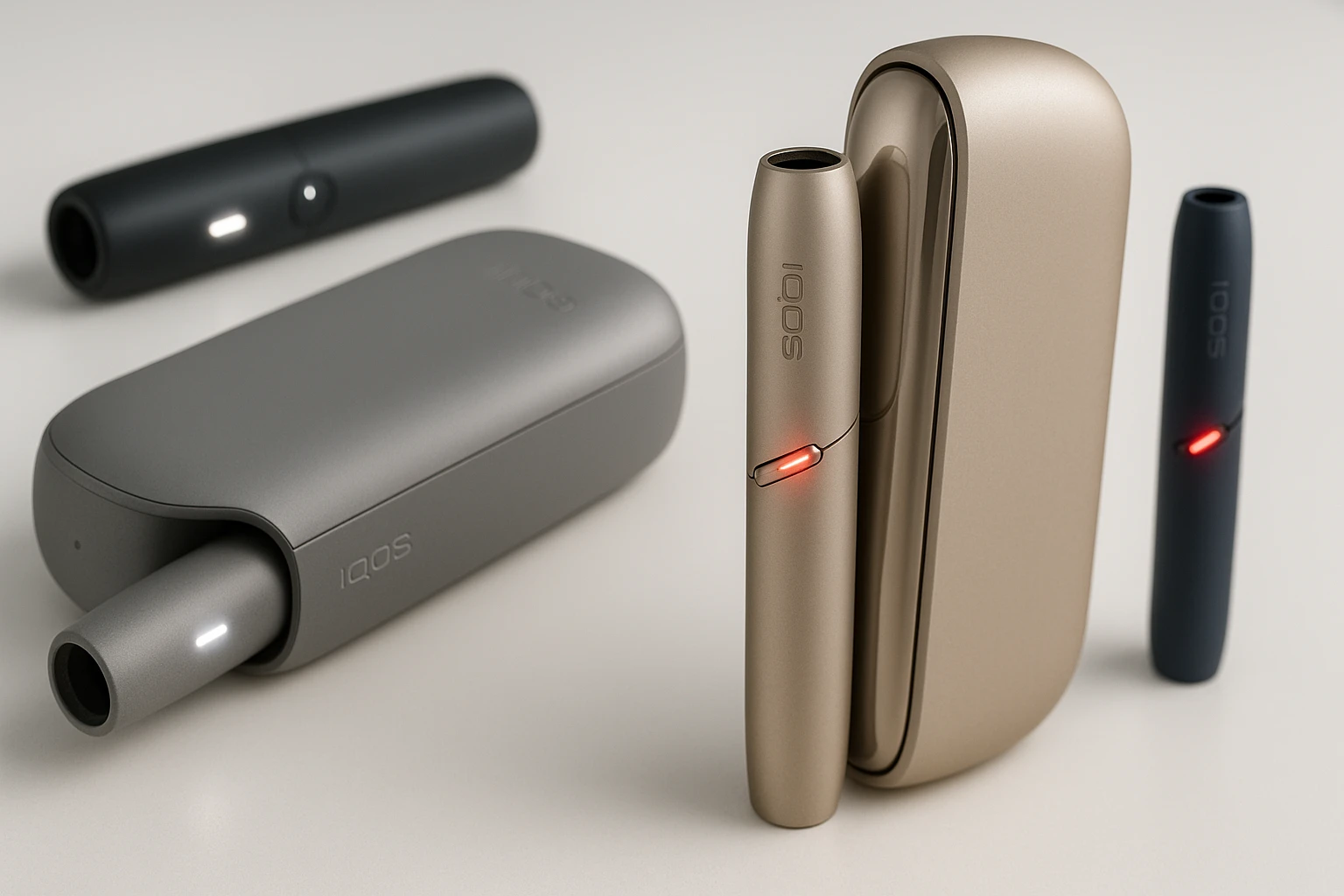
Your IQOS device just started blinking, and you’re not sure what it means. Is it dying? Broken? Or just asking for a quick charge?
The light indicators on your IQOS aren’t random. They’re your device’s way of communicating its status, needs, and occasional problems. Understanding what these blinking lights mean can save you time, money, and unnecessary trips to service centers.
This guide breaks down every light pattern you’ll see on your IQOS device, what triggers them, and exactly how to respond.
Why IQOS Uses Light Indicators
IQOS devices rely on LED lights because they’re tobacco heating systems with electronic components. Unlike traditional cigarettes, your IQOS needs to tell you about battery levels, heating status, and technical issues.
Think of these lights as your device’s dashboard. Just like your car’s fuel gauge or check engine light, IQOS indicators give you real-time information about what’s happening inside.
Most IQOS models use two colors: white and red. Some newer models add yellow or orange. Each color, pattern, and location means something specific.
What Different IQOS Light Colors Mean
Here’s a quick reference for what each light color indicates across IQOS models:
| Light Color | General Meaning | Urgency Level |
| White (Solid) | Device ready or fully charged | None – normal operation |
| White (Blinking) | Heating up or charging in progress | None – normal operation |
| White (Pulsing) | Temperature issue or self-cleaning | Low – wait or check temperature |
| Red (Solid) | Low battery or experience ending | Medium – charge soon |
| Red (Blinking) | Malfunction or critical error | High – action required |
| Yellow/Orange (Blinking) | Needs charging | Low – charge when convenient |
The location of the light matters too. Lights on the holder mean different things than lights on the pocket charger.
White Light Patterns and What They Mean
White lights are usually good news. They indicate normal operations, though sometimes they signal you need to wait.
Solid White Light
When you see a steady white light, your device is either fully charged or ready to use. On IQOS ILUMA and IQOS 3 DUO models, the number of white lights tells you how many uses you have left. Two lights mean two sessions available. One light means one session remaining.
This is the light you want to see. It means everything is functioning as it should.
Blinking White Light
A blinking white light typically appears during two situations. First, when your holder is heating up the tobacco stick. This takes about 20 seconds on most models. The light blinks to show the heating process is active.
Second, you’ll see blinking white when your device is charging. The pocket charger shows blinking white lights while it’s powering up the holder. Once charging completes, the light becomes solid.
Both situations are completely normal. Just wait for the process to finish.
Pulsing White Light
Pulsing white lights are different from blinking. The pulsing pattern looks like a slow breathing effect. This usually indicates one of two things.
Your device might be outside its operating temperature range. IQOS devices work best between 0°C and 40°C. In Dubai’s summer heat, if you leave your IQOS in a car or direct sunlight, it can overheat. In winter or heavily air-conditioned spaces, it might get too cold.
Give your device a few minutes to return to normal temperature. Don’t try to force it to work. The pulsing white light is a safety feature preventing damage.
On IQOS ORIGINALS DUO, pulsing white can also mean the self-cleaning cycle is overdue. This happens if you’ve kept the charger door open with the holder inside, preventing automatic cleaning.
Red Light Patterns and What They Mean
Red lights require attention. They’re not always emergencies, but they mean your device needs something from you.
Solid Red Light
A solid red light on the holder during use means your session is about to end. You have a few puffs left. This is normal and just a heads-up that the tobacco stick is nearly finished.
On the charger, a solid red light typically means the holder battery is completely drained. Place it in the pocket charger and wait about five minutes for it to charge enough for one use.
Neither situation indicates a problem. It’s just your device managing power efficiently.
Blinking Red Light
This is the most concerning indicator. A blinking red light signals a malfunction or critical error that needs fixing.
On IQOS ILUMA and IQOS ILUMA PRIME, a blinking red holder light can mean several things. The device might need a reset. There could be a magnet nearby interfering with the device’s calibration (ILUMA models use magnetic technology). Or there’s a genuine hardware issue.
On IQOS ORIGINALS DUO and IQOS 3 DUO, a blinking red holder light often indicates a broken heating blade. This is the small element inside the holder that heats the tobacco. If it’s damaged, the device can’t function properly.
When the pocket charger shows a blinking red light, it usually means poor contact between the holder and charger. Dust or debris on the charging contacts can cause this. Sometimes it indicates the charger itself has an issue.
Don’t ignore blinking red lights. They won’t resolve themselves.
What Triggers Red Lights
Several factors can cause red light indicators. Battery problems are the most common. If your battery is degraded from age or hasn’t charged properly, red lights appear more frequently.
Overheating is another trigger. Dubai’s extreme temperatures can push IQOS devices beyond their safe operating range. If the internal temperature sensor detects overheating, it shows a red warning and stops operation until the device cools.
Physical damage to internal components, especially the heating blade on older models, causes persistent red lights. Dropping your device or applying too much force when inserting tobacco sticks can break these delicate parts.
Connection issues between the holder and charger create temporary red lights. This is usually fixable with cleaning.
Yellow or Orange Light Indicators
Some IQOS models use yellow or orange lights to indicate charging needs. This color sits between the “all good” white and the “problem” red.
A blinking yellow or orange light means your battery level is low enough that you should charge soon, but not so critical that the device won’t work. Think of it as the 20% battery warning on your phone.
On IQOS ILUMA models, you’ll see this when the pocket charger drops below a certain threshold. Fifteen minutes of charging is usually enough to stop the yellow blinking.
This is a convenience feature, not an emergency. But if you ignore it, you’ll eventually see red lights instead.
Quick Fixes for Common Light Issues
Most IQOS light issues have simple solutions. Here’s what to try before assuming your device is broken.
For Any Blinking Red Light
Start with a device reset. This solves about 70% of blinking red light issues. On IQOS ILUMA, press and hold the button on the pocket charger for 10 seconds. Keep holding while lights fade out, then fade back in. The device will vibrate when the reset completes.
On IQOS 3 DUO and ORIGINALS DUO, remove the holder from the pocket charger. Press the pocket charger button for 10 seconds until lights fade. All lights will briefly blink white to confirm the reset.
If a reset doesn’t fix it, check for magnets nearby. IQOS ILUMA is particularly sensitive to magnetic interference. Move away from phone cases, magnetic car mounts, or any device with magnets.
For Charging Issues
Clean the charging contacts. These are the metal points where the holder connects to the pocket charger. Use a dry cotton swab to gently clean both the holder contacts and the charger contacts. Even invisible residue can prevent proper charging.
Make sure you’re using the official IQOS charger and cable. Third-party chargers might not deliver the right power specifications. Charging via a laptop USB port is slower and less reliable than using the wall adapter.
Check that the holder is inserted correctly. The metal connector should face downward in the pocket charger. If it’s upside down, the charger won’t recognize it.
For Temperature Warnings
If you see pulsing white lights or temperature-related red lights, give your device time to adjust. In Dubai’s heat, bring your IQOS indoors to cool down. Don’t put it in a refrigerator or freezer—extreme temperature changes can damage electronics.
In cold conditions, warm the device gradually. Keep it in your pocket close to body heat. Don’t use external heat sources like radiators.
Wait 10 to 15 minutes before trying to use the device again. The temperature sensors need time to register the change.
For White Light During Charging
If white lights blink during charging but never become solid (indicating full charge), you might have a battery issue. Check if the charger is plugged into a working outlet. Try a different power outlet to rule out electrical problems.
If the lights stop blinking after a few minutes but the device isn’t charged, your battery might be degraded. Batteries lose capacity over time. If your IQOS is over a year old with daily use, battery replacement might be necessary.
Device-Specific Light Patterns
Different IQOS models have unique light behaviors. Knowing your specific model helps you interpret signals correctly.
IQOS ILUMA Series (ILUMA, ILUMA PRIME, ILUMA ONE)
ILUMA devices use two types of lights: rounded lights for holder status and strip lights for charger battery. The holder shows white or red lights. The pocket charger shows both rounded lights (holder charge status) and strip lights (charger battery level).
Four strip lights on the charger mean over 75% battery. Three strips mean 50-75%. Two strips mean 25-50%. One strip means under 25%.
ILUMA’s magnetic technology makes it sensitive to magnetic interference. If you see blinking red lights, always check if there’s a magnet nearby.
IQOS ORIGINALS DUO and IQOS 3 DUO
These models have a heating blade inside the holder. This blade is visible when you remove the cap. Blinking red lights on these models often indicate heating blade damage.
Check the blade by removing the holder cap and looking inside. If the blade is bent, broken, or missing, the device needs repair or replacement. Don’t try to fix the blade yourself—it’s extremely delicate.
The self-cleaning feature on ORIGINALS DUO happens automatically when the holder is in the closed pocket charger. Keep the charger door closed between uses to ensure cleaning happens.
IQOS 2.4 PLUS
This older model uses three separate LEDs on the pocket charger. One LED for holder battery status, one for pocket charger battery, and one for Bluetooth (if you use the app).
Red lights on this model almost always mean the holder isn’t charged. The holder charges quickly in the pocket charger—about five minutes for one use, longer for full charge.
Clean the IQOS Device to sensor accuracy
Regular cleaning prevents many light indicator issues. Residue buildup affects heating, charging, and sensor accuracy.
Clean your holder after every 20 tobacco sticks or once a week, whichever comes first. In Dubai’s dusty environment, you might need to clean more frequently.
Use the cleaning tool provided with your IQOS. Insert it gently into the holder and rotate to remove tobacco residue. Don’t apply force. Never use water or cleaning liquids inside the holder.
Clean the charging contacts on both the holder and pocket charger weekly. A dry cotton swab works perfectly. This prevents the blinking red lights caused by poor contact.
For IQOS ILUMA models, cleaning is simpler because there’s no heating blade. Just use the provided tool to remove any debris from the holder chamber.
Preventing Light Indicator Problems
Most IQOS light issues are preventable with proper care and usage habits.
Always let your device complete its charging cycle. Interrupting charging repeatedly can affect battery health and trigger false warning lights.
Store your IQOS at room temperature when not in use. Don’t leave it in cars, especially during Dubai’s summer months when interior temperatures can exceed 60°C.
Insert tobacco sticks straight and gently. Don’t twist them. Forcing or twisting can damage the heating element and cause red light errors.
Avoid dropping your device. IQOS devices have precision electronics and delicate heating components. Even a small drop can misalign internal parts.
Use your device regularly if you own one. Batteries that sit unused for weeks can discharge completely and develop issues.
When Professional Help Is Needed
Some light indicator issues require expert attention. You shouldn’t try to fix everything yourself.
If blinking red lights persist after a reset and cleaning, there’s likely a hardware problem. The heating blade might be damaged, the battery could be failing, or internal connections might be loose.
If your device overheats repeatedly even in normal temperature conditions, the temperature sensor might be faulty. This is a safety issue that needs professional diagnosis.
If charging never completes despite different chargers and outlets, the battery or charging circuit has failed. Battery replacement by authorized service centers is the only solution.
In Dubai and the UAE, IQOS has official service centers and customer support. Check your warranty status before paying for repairs. Many issues are covered under warranty if your device is less than a year old.
Contact IQOS support if you see light patterns not described in the user manual or this guide. Unusual light behaviors might indicate rare technical issues.
Understanding Battery Life Through Iqos Lights
Your IQOS lights tell you about battery health over time. New devices hold charge longer and show consistent light patterns. As batteries age, you’ll notice changes.
If your pocket charger needs charging more frequently than when the device was new, the battery capacity has decreased. This is normal after 12 to 18 months of daily use.
If the holder doesn’t reach two full uses even after complete charging, the holder battery is wearing out. This affects ILUMA and DUO models that show multiple status lights.
Batteries degrade faster in extreme temperatures. Dubai users often experience faster battery wear due to heat exposure. Keeping your IQOS cool extends battery life and reduces warning lights.
When lights indicate charging but the battery percentage (if visible on paired apps) doesn’t increase normally, battery replacement is approaching necessity.
Making Sense of IQOS Multiple Simultaneous Lights
Sometimes you’ll see different lights at the same time. This combination tells you something specific.
If both holder lights and charger lights are red, the entire device needs charging. Plug in the pocket charger and wait for both to become white.
White holder lights with red charger lights mean the holder is ready but the charger battery is low. You can use the device but should charge the pocket charger soon.
Blinking lights on both holder and charger usually indicate a system-wide issue. Try a full device reset first. If both keep blinking red after reset, contact support.
The Bottom Line on IQOS Light Indicators
IQOS blinking lights aren’t mysterious. They’re simple status messages using color and pattern. White lights mean normal operation. Red lights mean problems. Yellow lights mean charge soon.
Most issues resolve with basic troubleshooting: reset the device, clean the contacts, check the temperature, ensure proper charging. These fixes work for about 80% of light-related problems.
The remaining 20% need professional attention. Don’t waste time on repeated troubleshooting if basic fixes don’t work. Contact IQOS support or visit a service center.
Understanding your device’s light language helps you respond quickly, prevents damage from ignored warnings, and keeps your IQOS functioning reliably.
Your IQOS is designed to last. Pay attention to what the lights tell you, maintain it properly, and you’ll rarely see anything except the steady white glow of a ready device.